
Short-form video content dominates digital marketing in 2026, capturing audience attention faster than any other medium. Whether you're producing content for social platforms, corporate communications, or promotional campaigns, understanding how to create a short video efficiently while maintaining professional quality separates successful brands from those struggling to gain traction. The ability to produce compelling video content quickly has become essential for businesses looking to stay competitive in an increasingly visual marketplace where attention spans continue to shrink and platform algorithms favor engaging video formats.
Understanding the Short Video Landscape
The definition of "short video" has evolved significantly over recent years. While traditional video content might run several minutes or longer, short-form videos typically range from 15 seconds to three minutes, depending on the platform and purpose. Instagram Reels, TikTok, and YouTube Shorts have redefined audience expectations, creating demand for punchy, high-impact content that delivers value immediately.
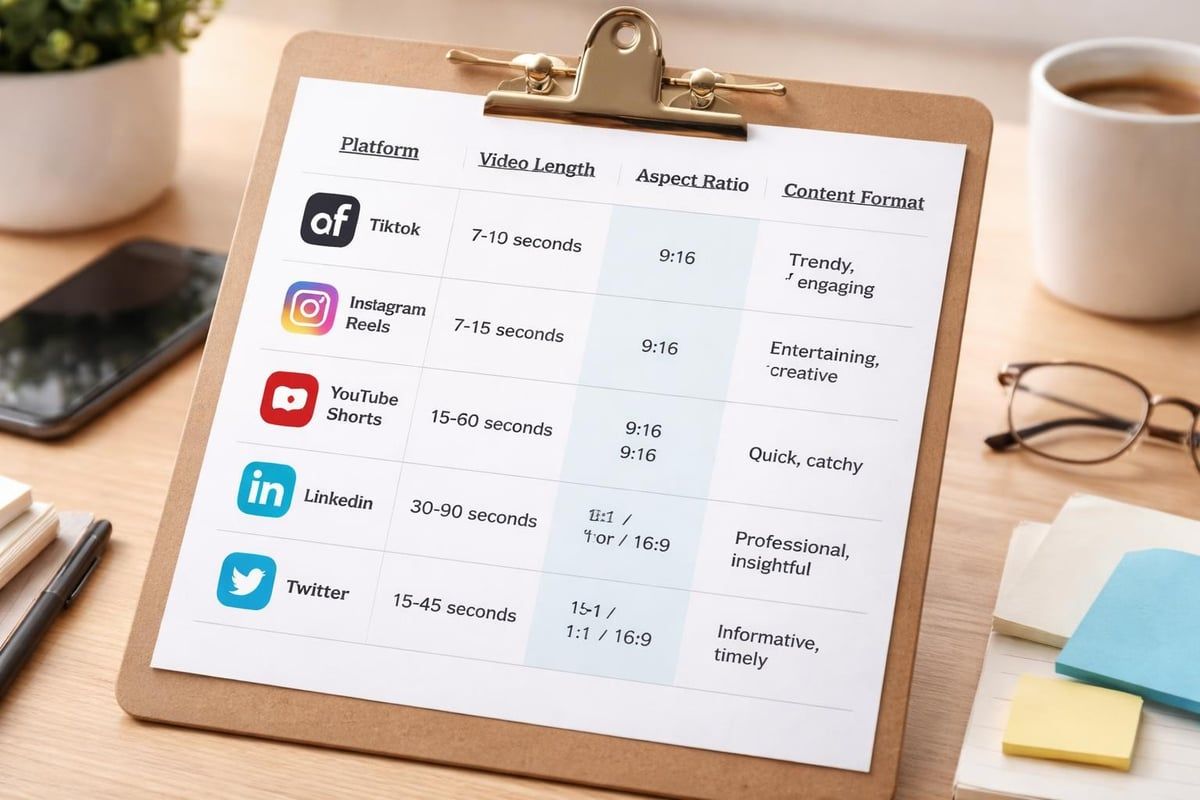
Platform-specific requirements shape your production approach:
- TikTok videos perform best between 21-34 seconds
- Instagram Reels optimal length ranges from 7-15 seconds
- YouTube Shorts allow up to 60 seconds
- LinkedIn video content sees highest engagement under 90 seconds
- Twitter/X videos work best under 45 seconds
When you create a short video, understanding these platform nuances helps you optimize content for maximum reach and engagement. Each platform's algorithm rewards different content characteristics, from watch-through rates to shares and saves. Best practices for video production emphasize the importance of knowing your distribution channel before filming begins.
Pre-Production Planning for Maximum Efficiency
Successful short videos begin long before you press record. Pre-production planning determines whether your content achieves its objectives or wastes valuable resources. Start by defining clear goals: Are you building brand awareness, driving website traffic, educating customers, or generating leads?
Scripting and Storyboarding
Even 15-second videos benefit from structured planning. Write a tight script that communicates one core message. Avoid cramming multiple ideas into short content, which dilutes impact and confuses viewers.
Your script should follow this framework:
- Hook (first 2-3 seconds): Grab attention immediately
- Value proposition (next 5-10 seconds): Deliver your main message
- Call-to-action (final 2-5 seconds): Direct viewers to next steps
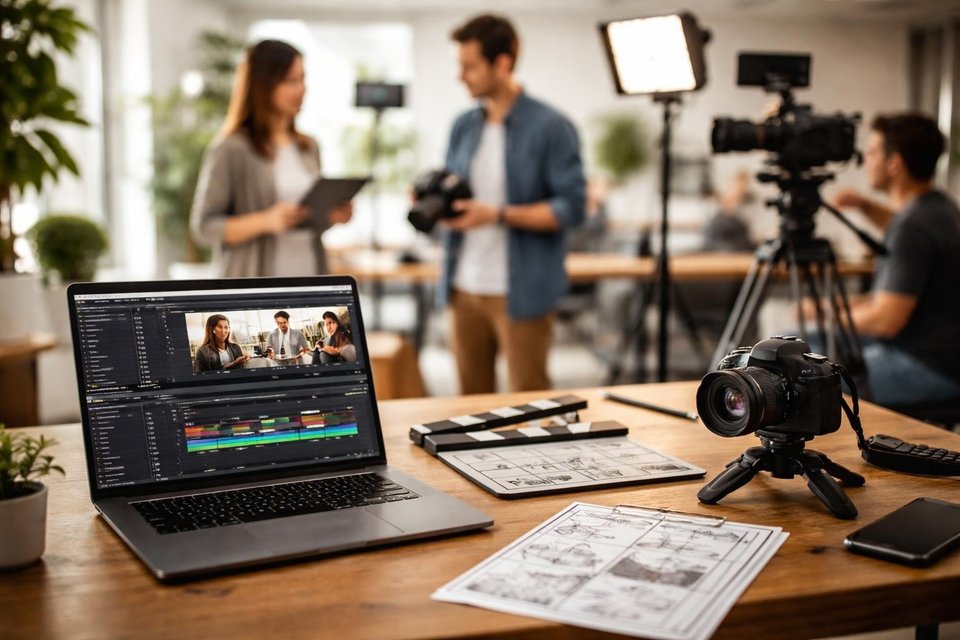
Storyboarding helps visualize each shot before production begins. Simple sketches or shot lists ensure you capture all necessary footage during filming sessions, reducing expensive reshoots. When working with corporate video services, professional teams develop detailed storyboards that align stakeholders and streamline production workflows.
Location Scouting and Equipment Preparation
Location dramatically impacts production quality and efficiency. Scout locations in advance, considering lighting conditions, background elements, sound quality, and accessibility. Indoor locations offer controlled environments, while outdoor settings provide natural aesthetics but introduce variables like weather and ambient noise.
| Equipment Level | Camera | Audio | Lighting | Investment Range |
|---|---|---|---|---|
| Smartphone | iPhone 14/15 Pro or Samsung S23+ | Wireless lavalier mic | Natural + reflector | $50-200 |
| Entry Professional | Mirrorless camera (Sony A7 IV) | Shotgun mic + recorder | LED panel kit | $2,000-5,000 |
| Full Professional | Cinema camera (RED Komodo) | Wireless system + boom | Multi-light setup | $15,000-50,000+ |
The right equipment depends on your content goals and budget. Many brands successfully create a short video using just smartphones and affordable accessories, while others require professional-grade gear for specific visual effects or brand standards.
Production Techniques That Save Time
Efficient filming techniques maximize output while maintaining quality standards. Professional video producers develop systems that reduce shooting time without compromising results.
Batch Recording Content
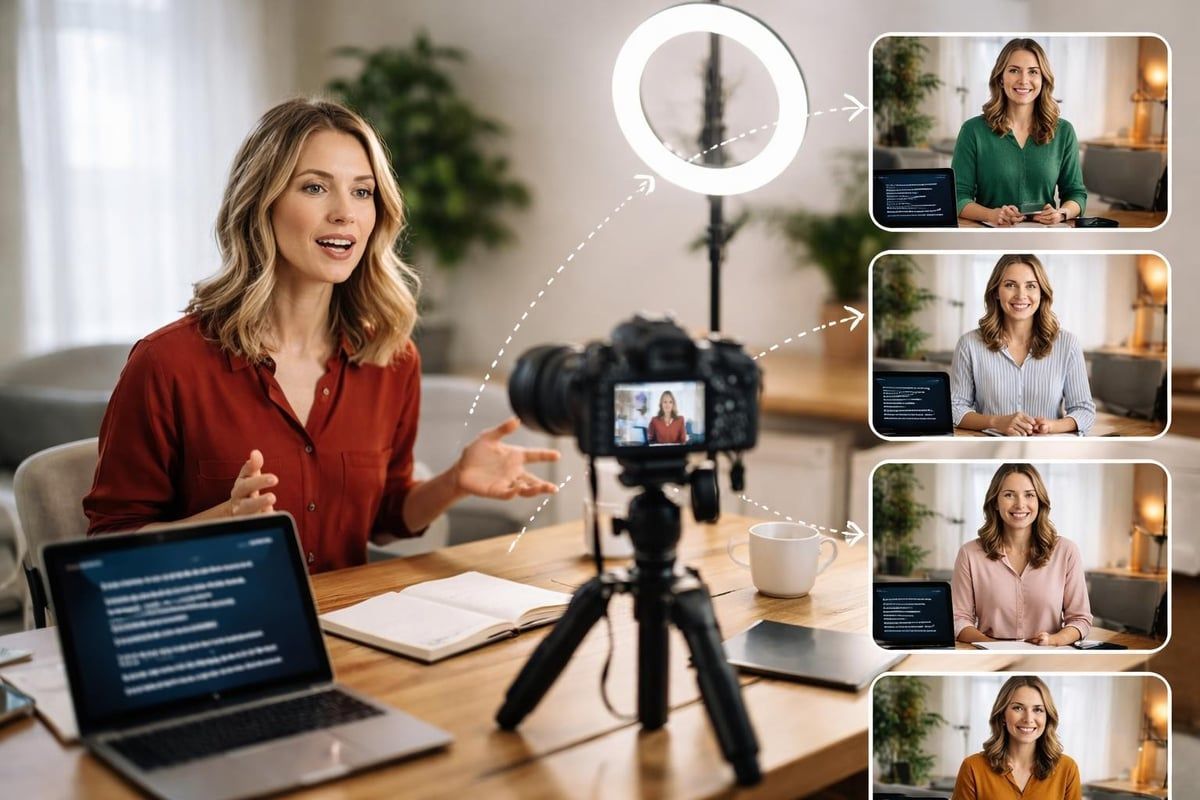
Record multiple videos during single production sessions. This approach dramatically reduces per-video costs and ensures consistent visual branding across content series. Set up your filming area once, then shoot five to ten video variations by changing only scripts, props, or simple background elements.
Batch recording benefits include:
- Reduced setup and breakdown time
- Consistent lighting and color grading
- Lower per-video production costs
- Faster content calendar completion
- More efficient use of talent and crew time
When you create a short video in batches, plan content themes that allow seamless transitions between takes. For example, a business might record all product feature videos in one session, then schedule separate sessions for customer testimonials and behind-the-scenes content.
Camera Settings and Shot Composition
Technical settings significantly impact both visual quality and post-production efficiency. Shoot in the highest resolution your distribution platform supports, even if you plan to downscale later. This provides flexibility for cropping, stabilization, and future repurposing.
Follow the rule of thirds for compelling composition. Position subjects at intersection points rather than dead center, creating more dynamic, professional-looking frames. Maintain consistent headroom and lead room across shots to streamline editing.
Technical standards and quality guidelines recommend specific frame rates and resolution settings that ensure broadcast-quality output. Most platforms now support 4K resolution, though 1080p remains perfectly acceptable for social content when properly lit and composed.
Editing Strategies for Engaging Content
Post-production transforms raw footage into polished, engaging content. Modern editing software offers powerful tools that were previously available only in professional suites, democratizing video production capabilities.
Software Selection and Workflow
Choose editing software that matches your skill level and production requirements. Mobile apps like CapCut and InShot enable quick edits directly on smartphones, perfect for social-first content. Desktop applications like Adobe Premiere Pro, Final Cut Pro, or DaVinci Resolve offer advanced features for complex projects.
Establish an organized workflow:
- Import and organize all footage into clearly labeled folders
- Create a rough cut assembling clips in sequence
- Refine timing and pacing for optimal engagement
- Add graphics, text, and effects that reinforce your message
- Color grade for consistency and mood
- Mix audio balancing dialogue, music, and sound effects
- Export in platform-appropriate formats
Fundamentals for making short-form videos quickly emphasize efficiency through template creation and asset libraries. Build a collection of graphics, transitions, and music tracks that maintain brand consistency while accelerating production timelines.
Pacing and Retention Optimization
Viewer retention determines algorithmic success on most platforms. Analyze where viewers drop off, then adjust pacing accordingly. Short videos demand quick cuts, dynamic camera movements, and frequent visual changes to maintain engagement.
Retention optimization techniques:
- Change shots every 2-4 seconds
- Use jump cuts to remove pauses and filler words
- Add B-roll footage that illustrates spoken concepts
- Incorporate text overlays highlighting key points
- Include pattern interrupts (visual or audio changes) every 5-7 seconds
When businesses create a short video optimized for retention, they typically see 40-60% higher completion rates compared to slowly paced content. Higher completion rates signal quality to platform algorithms, triggering broader distribution and increased organic reach.
Audio Considerations for Professional Results
Poor audio quality destroys otherwise excellent video content. Audiences forgive imperfect visuals but quickly abandon videos with bad sound. Invest in audio equipment proportional to your overall production budget.
Recording Clean Dialogue
Capture dialogue in controlled environments whenever possible. Background noise, echo, and wind dramatically reduce perceived professionalism. Use directional microphones positioned close to subjects, typically 6-12 inches away for optimal clarity.
When filming on location, scout for quiet areas away from traffic, HVAC systems, and other consistent noise sources. If environmental sound proves unavoidable, consider recording voice-over narration in a quiet space during post-production instead of relying on location audio.
Music Selection and Sound Design
Background music sets emotional tone and fills awkward silence, but requires careful selection. Use royalty-free music libraries or licensed tracks appropriate for commercial use. Avoid recognizable copyrighted songs unless properly licensed, as copyright infringement can result in content removal and account penalties.
Balance music volume to support rather than overwhelm dialogue. Generally, background music should sit 15-20 decibels below vocal tracks. Add subtle sound effects that enhance key moments without distracting from your core message.
Professional music and video production services provide access to extensive music libraries and sound designers who craft custom audio that perfectly complements visual content.
Lighting Techniques for Various Budgets
Proper lighting transforms amateur videos into professional content. You don't need expensive equipment to achieve well-lit footage, but you must understand basic lighting principles.
Natural Light Optimization
Natural light provides beautiful, free illumination when used correctly. Position subjects near windows during daytime hours, using sheer curtains to diffuse harsh direct sunlight. Avoid mixed lighting scenarios where natural light combines with indoor lights of different color temperatures.
Natural light tips:
- Film during "golden hour" (shortly after sunrise or before sunset) for warm, flattering light
- Position subjects facing windows rather than backlit
- Use white foam boards or reflectors to bounce light into shadowed areas
- Maintain consistent shooting times for matching footage across takes
- Monitor cloud cover changes that affect light intensity
Artificial Lighting Setups
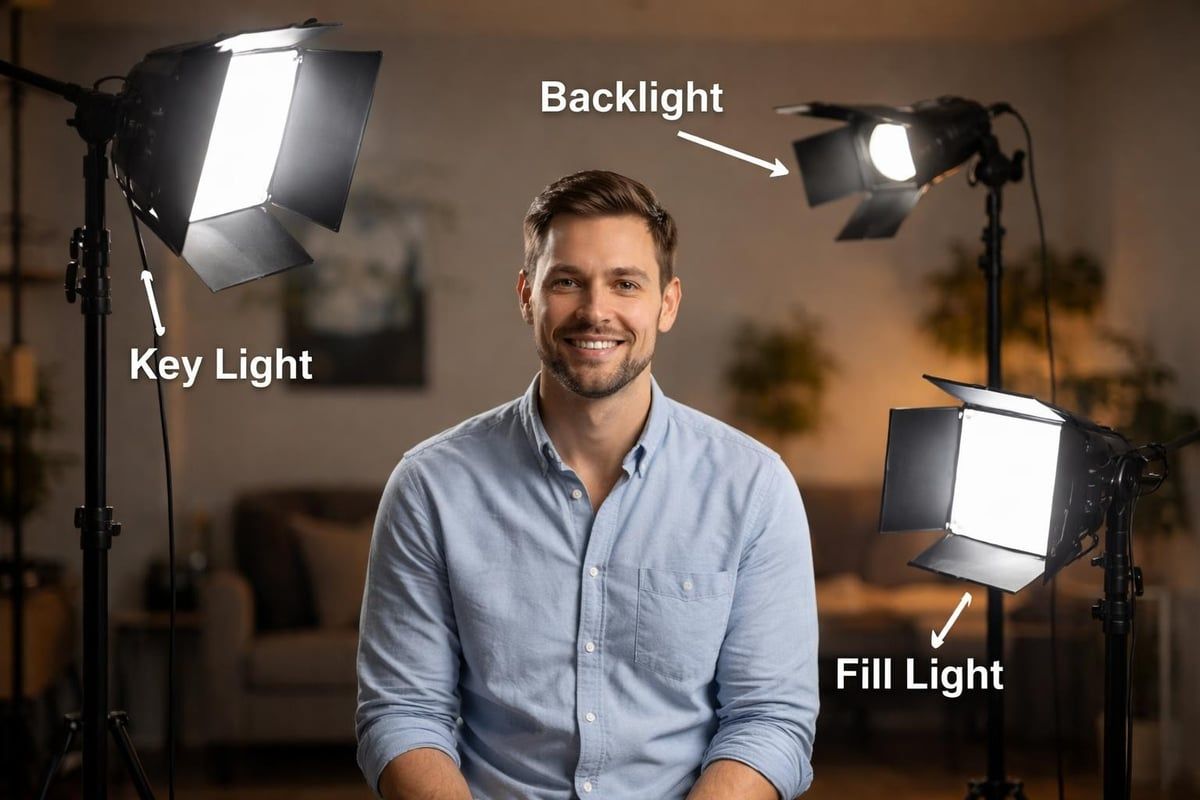
When natural light proves insufficient or inconsistent, artificial lighting provides control and reliability. A basic three-point lighting setup includes a key light (main illumination), fill light (softens shadows), and backlight (separates subject from background).
LED panels offer energy-efficient, color-adjustable lighting ideal for video production. Unlike traditional tungsten lights, LEDs remain cool during extended filming sessions and allow precise color temperature control matching natural daylight or warm indoor conditions.
Budget-conscious creators can achieve excellent results with affordable LED panels from brands like Neewer or GVM. When you create a short video on limited budgets, even $100-300 invested in basic lighting yields dramatic quality improvements worth far more than equivalent camera upgrades.
Optimizing Content for Specific Platforms
Each social platform has unique technical requirements and audience expectations. Content that performs well on LinkedIn may flop on TikTok, even with identical messaging.
Platform-Specific Optimization
Instagram Reels favor vertical 9:16 aspect ratio content with trending audio, quick cuts, and visual effects. Text overlays should appear in the center-safe zone to avoid interface obstruction. Post during peak engagement hours (typically 11 AM - 1 PM and 7 PM - 9 PM EST) for maximum initial reach.
LinkedIn video performs best with professional, value-driven content in square (1:1) or vertical (9:16) formats. Educational content, industry insights, and thought leadership pieces generate highest engagement. Include captions since many LinkedIn users watch with sound off during work hours.
TikTok rewards authentic, entertaining content over polished perfection. Use trending sounds, participate in challenges, and embrace platform-native features like stitches and duets. The algorithm heavily weights watch time and completion rate, so hook viewers within the first second.
YouTube Shorts allow both vertical and square formats up to 60 seconds. Unlike other platforms, YouTube provides better long-term discovery through search and related video suggestions. Optimize titles and descriptions with relevant keywords for ongoing organic traffic.
Understanding video marketing strategies specific to each platform ensures your content reaches and resonates with target audiences across channels.
Measuring Success and Iterating
Creating effective short videos requires ongoing analysis and refinement. Track performance metrics to understand what resonates with your audience, then adjust future content accordingly.
Key Performance Indicators
Different video objectives require different success metrics. Brand awareness campaigns prioritize reach and impressions, while lead generation focuses on click-through rates and conversions.
| Objective | Primary Metrics | Secondary Metrics |
|---|---|---|
| Brand Awareness | Views, Reach, Impressions | Share rate, Brand lift |
| Engagement | Likes, Comments, Shares | Save rate, Profile visits |
| Lead Generation | Click-through rate, Conversions | Cost per lead, Lead quality |
| Education | Watch time, Completion rate | Saves, Return viewers |
| Sales | Conversion rate, Revenue | Cart additions, ROAS |
Analyze performance data weekly during initial campaigns, identifying patterns in high and low-performing content. Most platforms provide native analytics showing demographic data, traffic sources, and engagement patterns. Use these insights to refine targeting, content style, and posting schedules.
A/B Testing Variables
Systematically test variables to optimize performance. When you create a short video campaign, consider testing:
- Thumbnails and opening frames (first impression impact)
- Hook variations (different opening lines or visuals)
- Video length (comparing 15, 30, and 60-second versions)
- Call-to-action placement (beginning, middle, or end)
- Background music styles (upbeat, dramatic, minimal)
- Posting times (morning, afternoon, evening)
Change only one variable per test to isolate performance factors. Document results systematically, building a knowledge base of what works for your specific audience and industry.
Repurposing Content Across Formats
Maximize production investment by transforming single video projects into multiple content pieces. This approach, sometimes called "atomization," extracts maximum value from each production session.
Content Transformation Strategies
A single long-form video can generate dozens of short clips. Interview content particularly lends itself to repurposing, with individual questions and answers becoming standalone social posts. Behind-the-scenes footage from productions creates authentic, engaging content that humanizes your brand.
Transform video content into:
- Social media clips highlighting key moments
- Blog post supplements embedded within written content
- Email marketing video thumbnails driving click-through
- Presentation materials supporting sales and training
- Testimonial compilations combining customer quotes
- Tutorial series breaking processes into steps
Professional services understand how to make tutorial videos that serve multiple purposes across marketing channels. When planning productions, think beyond single-use content toward scalable, multipurpose assets.
Maintaining Brand Consistency
As you repurpose and create a short video from existing footage, maintain consistent visual branding. Establish templates for lower thirds, text overlays, color grading, and transitions that appear across all content. Consistency builds brand recognition and professional credibility.
Style guides document brand standards including approved fonts, colors, logo usage, and tone of voice. Reference these guidelines throughout production to ensure every video reinforces rather than dilutes brand identity.
Advanced Techniques for Competitive Advantage
As short video becomes increasingly competitive, advanced techniques help content stand out in crowded feeds.
Motion Graphics and Animation
Incorporating motion graphics elevates production value significantly. Animated text, lower thirds, and transitional elements create polish that distinguishes professional content from amateur productions. Tools like Adobe After Effects or Apple Motion enable sophisticated graphics, while simpler options exist within most editing platforms.
Consider adding:
- Animated logo reveals and watermarks
- Kinetic typography emphasizing key phrases
- Data visualizations and infographics
- Product demonstrations with callouts
- Transition effects between scenes
Animation tips for professional results demonstrate how businesses without extensive animation experience can incorporate motion graphics effectively.
Strategic B-Roll Usage
B-roll footage (supplementary visuals covering voice-over or dialogue) prevents visual monotony and illustrates abstract concepts. When discussing products, show them being used. When explaining processes, demonstrate each step visually.
Build a B-roll library of generic footage useful across multiple projects: office environments, team collaboration, product close-ups, customer interactions, and industry-specific scenes. This asset library accelerates future production timelines when you need to create a short video quickly without scheduling full production sessions.
Collaboration and Talent Management
Working effectively with on-camera talent significantly impacts final results. Even professional actors benefit from clear direction and comfortable filming environments. When working with company executives or employees unfamiliar with video production, set expectations, provide scripts or talking points, and allow multiple takes without pressure.
Best practices for corporate video production emphasize the importance of talent preparation and direction in achieving natural, authentic performances that resonate with audiences.
Cost Management and Resource Allocation
Understanding production economics helps businesses allocate resources effectively and make informed decisions about in-house versus outsourced production.
Budget Considerations
Video production costs vary dramatically based on scope, quality requirements, and production approach. Simple smartphone videos cost virtually nothing beyond time investment, while professional productions with crews, equipment, and post-production services run thousands per finished minute.
Typical cost ranges for different approaches:
- DIY smartphone production: $0-500 per video (equipment and software only)
- Semi-professional single-operator: $500-2,000 per video
- Small professional crew: $2,000-8,000 per video
- Full production company: $5,000-25,000+ per video
Video pricing depends heavily on deliverable quantity, revision rounds, licensing requirements, and usage rights. Businesses producing regular content often negotiate package deals or retainer arrangements providing better per-video economics than one-off projects.
Build vs. Buy Decisions
Determine whether building internal video production capabilities or outsourcing to professionals makes financial sense. Companies requiring frequent content updates may justify hiring in-house videographers and purchasing equipment. Organizations needing occasional high-impact videos typically benefit from partnering with professional production companies.
Consider total cost of ownership including equipment depreciation, software subscriptions, ongoing training, and opportunity costs when comparing options. Sometimes hybrid approaches work best, handling simple content internally while outsourcing complex productions requiring specialized expertise.
Distribution Strategies for Maximum Reach
Creating excellent content matters little without effective distribution. Develop comprehensive distribution strategies that ensure target audiences actually see your videos.
Multi-Platform Publishing
Publish content across multiple platforms simultaneously, adjusting formats and messaging for each channel's unique characteristics. Use scheduling tools like Hootsuite, Buffer, or Later to coordinate releases and maintain consistent publishing cadence.
Cross-platform distribution checklist:
- Export platform-specific formats (aspect ratios, resolutions)
- Customize captions and descriptions for each platform
- Adjust thumbnails highlighting different selling points
- Tag relevant accounts and use platform-appropriate hashtags
- Schedule posts at optimal times for each platform's audience
- Respond promptly to comments driving engagement signals
When you create a short video, consider how it fits within broader content calendars and marketing campaigns. Coordinate video releases with product launches, seasonal promotions, or industry events for amplified impact.
Paid Promotion Strategies
Organic reach limitations on most platforms necessitate paid promotion for reliable results. Even modest advertising budgets can significantly extend content reach and target specific demographic segments.
Start with small test budgets, perhaps $50-100 per video, measuring cost per view, engagement rate, and conversion metrics. Scale spending on top-performing content while pausing or adjusting underperforming campaigns. Platform advertising interfaces provide detailed targeting options based on demographics, interests, behaviors, and custom audiences.
Consider working with video production companies that offer integrated production and promotion services, ensuring content is optimized for both organic and paid distribution from conception through execution.
Accessibility and Inclusive Design
Accessible video content reaches wider audiences while demonstrating corporate social responsibility. Implementing accessibility features often improves engagement across all viewer segments, not just those with disabilities.
Captions and Transcripts
Always include captions on video content. Most social platforms now auto-generate captions, though accuracy varies. Review and edit auto-captions for precision, particularly with industry terminology, product names, and proper nouns.
Captions benefit:
- Viewers watching without sound (estimated 85% of social video)
- Non-native speakers and international audiences
- Search engine optimization (caption text is indexable)
- Viewers with hearing impairments
- Comprehension and retention for all audiences
Provide full transcripts for longer content, particularly educational or instructional videos. Transcripts support repurposing into blog posts, email content, and other written formats.
Visual Accessibility Considerations
Design visual elements with color-blind viewers in mind, avoiding reliance on color alone to convey information. Ensure sufficient contrast between text and backgrounds for readability. Use large, clear fonts (minimum 24pt for mobile viewing) and avoid excessive visual clutter.
When creating content featuring people, represent diverse backgrounds, abilities, and perspectives. Inclusive representation expands audience connection and reflects contemporary business values.
Creating effective short videos requires balancing technical excellence with strategic thinking, understanding both production fundamentals and platform-specific nuances. As video continues dominating digital communication in 2026, businesses that master efficient production workflows gain significant competitive advantages. Whether you're just starting to create a short video content or scaling existing capabilities, Viva Media delivers the expertise, equipment, and creative vision needed to produce high-performance video content that drives measurable business results throughout the Greater Toronto Area.